Roblox Pickaxe Tycoon Guide (bss-tools v1.0)
Pickaxe Tycoon has quietly become one of the most addictive progression games on Roblox right now, and if you’ve spent any time with it, you already know exactly why. The core loop is simple enough to pick up in minutes — mine ore, fill your backpack, deposit it, earn money, buy a better pickaxe — but the deeper you get into the game, the more you realise just how much of your time is eaten up by repetitive tasks. Merging pickaxes to the next tier requires you to sit there clicking through dozens of combinations. Chests spawn across the map and disappear before you can reach them. Your backpack fills up constantly, and if you’re not paying attention, you’ll miss money drops that set your upgrade cycle back by several minutes. It’s a game that rewards patience, but at a certain point the grind stops feeling rewarding and starts feeling like a second job.
That’s the exact problem bss-tools was built to solve. This guide walks you through every feature included in the bss-tools dashboard for Pickaxe Tycoon, explains what each one does in practical terms, and shows you step by step how to get everything up and running. Whether you’re a casual player who just wants the game to feel smoother or a dedicated grinder trying to hit end-game as efficiently as possible, this tool genuinely changes the experience.
Breaking Down the Game: Where Most Players Get Stuck
Before diving into the features, it’s worth understanding where Pickaxe Tycoon actually becomes a challenge. The early game is breezy — ore is plentiful, money flows in quickly, and your first few pickaxe upgrades feel satisfying. The wall hits somewhere in the mid-game, usually around the point where merging to the next tier requires more items than your backpack can hold in a single run. Suddenly you’re doing four or five deposit trips just to set up one merge. Meanwhile chests are spawning in corners of the map you haven’t visited, and your money counter is ticking up faster than you can click to collect it.
End-game is even more demanding. The most valuable pickaxes require chains of merges, precise inventory management, and almost constant attention. Most players either plateau here or start spending real time grinding sessions that stretch well beyond what’s fun. bss-tools automates every single one of these pain points.
Feature Breakdown: What’s Inside bss-tools
Here’s a full rundown of every feature in the dashboard and what it actually does for your game:
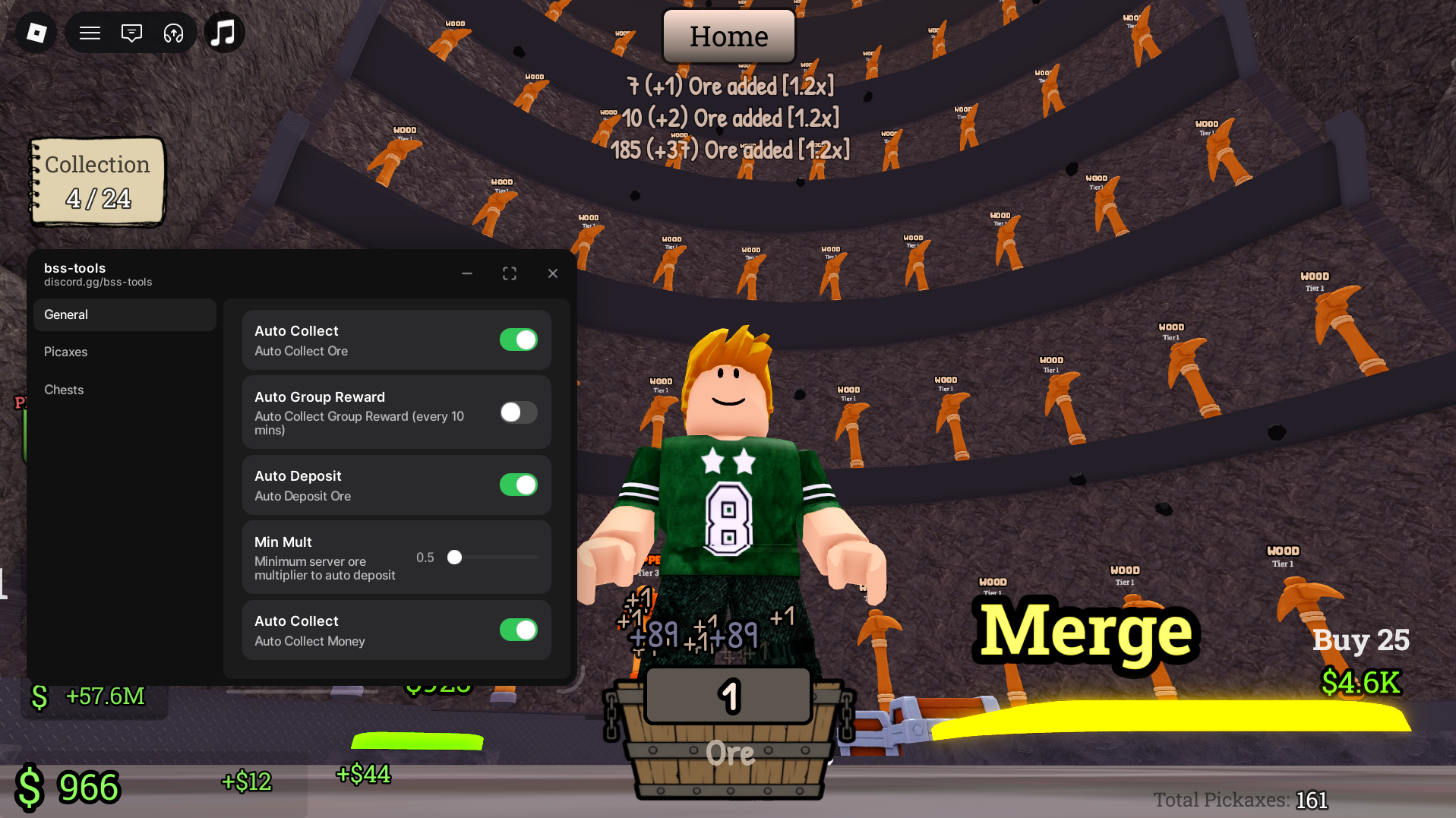
Auto Collect Ore — As soon as ore drops, this feature grabs it and sends it straight to your backpack. No more walking over drops or missing ore that spawns at an awkward angle. Your collection rate goes up significantly from the first moment you enable it.
Smart Auto Deposit Module — This one watches your carrying capacity in real time. The moment your backpack hits its limit, you’re automatically sent to the processing station to deposit. You’ll never waste time running back manually or lose ore because you forgot to check your capacity mid-grind.
Automated Money Collector — Every coin your operation generates gets swept up automatically the instant it appears. This is more valuable than it sounds — missed money drops in the mid and late game can push your next upgrade back by several minutes, and over a long session that adds up fast.
Auto Chests & Opener Utility — Chests are some of the best rewards in Pickaxe Tycoon, but they’re scattered across the map and easy to miss. This utility scans your zone continuously, routes to every chest spawn, and opens them automatically. You’ll unlock better rewards and rack up bonus income without having to move at all.
Auto Buy & Merge Framework — This is the big one. It monitors your funds constantly, automatically purchases the next available pickaxe upgrade when you have enough money, and chains merges all the way up to the highest tier your current inventory supports. What used to take twenty minutes of manual clicking now happens in the background while you do literally anything else.
How to Get Started: Step-by-Step Setup
Getting bss-tools running on Pickaxe Tycoon is straightforward. Follow these steps in order and you’ll have the dashboard active within a few minutes:
- Grab the configuration — Head to the repository link at the bottom of this guide and copy the full configuration string to your clipboard. This is the file that tells the dashboard how to interact with Pickaxe Tycoon specifically.
- Open your dashboard software — Launch your bss-tools compatible dashboard application. Make sure you’re running the latest available version before continuing, as older versions may not be fully compatible with recent Pickaxe Tycoon updates.
- Load into Pickaxe Tycoon — Open Roblox and start a Pickaxe Tycoon session as normal. Let the game fully load before moving to the next step.
- Paste and apply — With the game running, switch back to your dashboard, paste the configuration string into the input field, and hit apply. The bss-tools overlay will appear on your screen, and all features will be available to toggle individually from the interface.
Pro Tips for Getting the Most Out of bss-tools
A few things worth knowing once you’re up and running:
Don’t switch on every feature at once when you first load in. Let Auto Collect and Auto Deposit run for one full cycle first so your inventory is clean and organised. Starting the Auto Merge framework on a tidy backpack means it reaches higher tiers faster and with fewer errors.
If you’re in a server with a lot of other players, the Auto Chest feature becomes even more valuable since competition for chest spawns is higher. Enable it early and let it run passively throughout your session.
For players in the mid-game grind, focus the Auto Buy & Merge Framework on a single pickaxe line rather than spreading funds across multiple upgrade paths. Concentrating on one chain gets you to max tier significantly faster than trying to level everything simultaneously.
[Pickaxe Tycoon] Open-Source Repository
The Script file is publicly available for full transparency
Troubleshooting: Common Issues and How to Fix Them
Features stopped working after a game update — Pickaxe Tycoon updates fairly regularly, adding new pickaxe tiers, chest types, and map changes. When a major update drops, some features may temporarily stop responding. The fix is to update your dashboard application to its latest patch. Developers typically push compatibility updates within a day or two of major game patches.
Auto Merge isn’t chaining properly — If the merge framework seems to stall mid-chain, try toggling the feature off and back on. This resets the tier detection and usually resolves the issue without needing a full restart.
Overlay not appearing after applying the config — Double check that you copied the full configuration string with no extra spaces at the beginning or end. A partial paste is the most common reason the overlay fails to load.
Credits: bss-tools has been developed entirely by the gifted open-source developer, bss-tools.
Quick Tip: The fastest way to reach end-game in Pickaxe Tycoon is to let Auto Deposit and Auto Money run overnight on a low-traffic server. By morning your funds will be high enough that the Auto Buy & Merge Framework can chain straight through several tiers in a single session.

JJK is the creator and the founder of Bloxhacks with years of experience under him he dedicated to reviewing, debugging and also sharing the best game utilities, with step by installation guides online.






