Roblox My Gaming Cafe! Guide (Dubu Hub v3.2)
If you’ve ever tried to build a serious operation in My Gaming Cafe!, you’ll know the feeling — you’ve got the vision for the ultimate internet cafe, rows of maxed-out rigs, premium peripherals everywhere, rare decorations filling every corner, but the game has other ideas. Every upgrade requires you to manually click through menus, every new piece of hardware needs to be purchased the moment funds land, and the spin wheel eats your time with common drops over and over before you see anything worth having. In the early game this is manageable, but by the time you’re pushing for mythical parts and high-tier computer builds, the manual workload becomes genuinely exhausting. A single distracted minute means missed purchases, stalled upgrades, and a cafe that falls behind where it should be.
My Gaming Cafe! is fundamentally a numbers game — the player who manages their cash flow most efficiently and reacts to upgrade windows fastest is the one who scales quickest. That’s exactly the gap Dubu Hub fills. This guide breaks down every feature in the dashboard, explains the real strategic value behind each one, and walks you through setup from start to finish.
Why My Gaming Cafe! Gets Harder as You Progress
The early floors of your cafe come together quickly. Cash flows in at a pace that keeps up with your spending, upgrades are cheap, and the spin wheel occasionally hands you something useful. The difficulty curve kicks in once you start chasing the higher-tier hardware. Premium monitors, top-end keyboards, and mythical decorative parts all cost significantly more and become available in narrow purchase windows that close fast. Miss one and your upgrade chain stalls, which delays your passive income growth, which pushes back your next upgrade window — a compounding problem that snowballs quickly.
The spin system adds another layer of frustration. The odds of landing rare prizes are low by design, and sitting through dozens of common drops to reach something valuable is one of the most time-consuming parts of the mid and late game. Most players either burn out here or accept a much slower progression pace than the game is actually capable of. Dubu Hub is built specifically around solving these bottlenecks.
What Dubu Hub Does: Full Feature Rundown
Continuous Auto Upgrade Engine — This feature scans your cafe infrastructure constantly and automatically applies available cash to any item ready to level up. Computers, desks, and facility stats get maxed out without you touching a single menu. In practice this means your cafe is always running at peak efficiency, even when you’re not actively watching the screen.
Smart Auto Buy Module — Hardware availability in My Gaming Cafe! moves fast, especially in busy servers. This module monitors your inventory in real time and purchases monitors, keyboards, peripherals, and computer parts the instant they become available. No delays, no missed windows, no manually checking whether your funds are high enough. Your cafe maintains a constant supply of top-tier gear automatically.
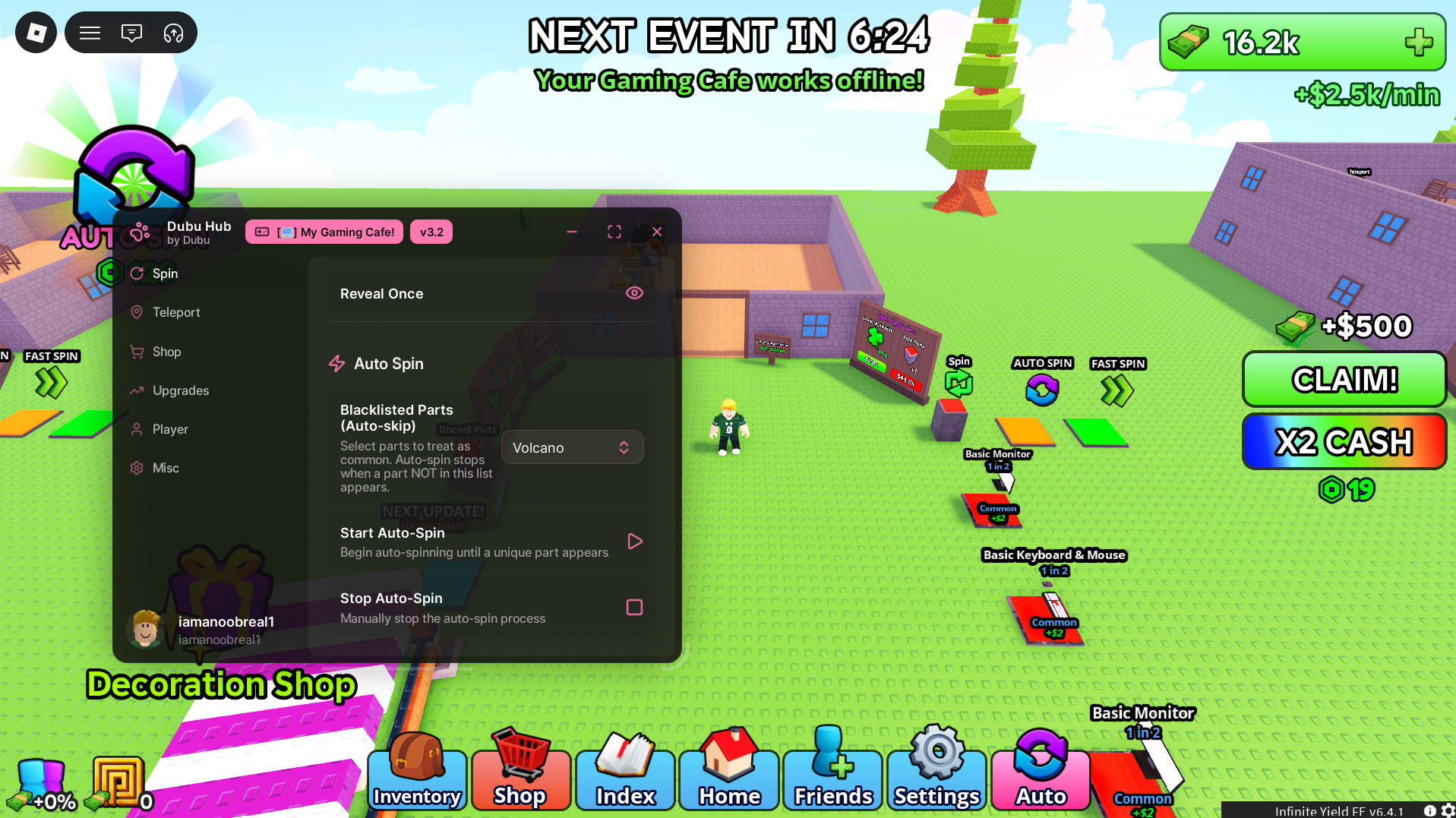
Automated Spin Bypass — Instead of sitting through the spin wheel manually, this feature runs it on a continuous loop at high speed and halts automatically when a rare or unique prize lands. Common drops are skipped entirely, so you’re only stopping for items that actually matter. Over a long session this saves a significant amount of time and dramatically improves your rare item acquisition rate.
Map Coordinate Navigation — Rather than walking your character across the map to reach the Decoration Shop, prize collection areas, or other points of interest, this feature teleports you directly to any map coordinate instantly. It’s a small quality-of-life feature but one that adds up considerably over a full session.
Getting Dubu Hub Running: Step-by-Step
Setup is quick once you know the steps. Follow these in order:
- Retrieve the configuration — Visit the repository link at the bottom of this guide and copy the complete Dubu Hub configuration string to your clipboard. Make sure you grab the full string with nothing cut off.
- Open your dashboard application — Launch your Dubu Hub compatible dashboard software. Before proceeding, check that you’re on the latest available version — outdated versions can cause compatibility issues with recent game updates.
- Load into My Gaming Cafe! — Open Roblox and start a session in My Gaming Cafe!. Let the game fully load before moving to the next step, including waiting for your cafe layout to render completely.
- Paste and activate — With the game running, switch to your dashboard, paste the configuration into the input field, and hit apply. The pink Dubu Hub overlay will initialise on your screen and all features will be individually toggleable from the interface.
Getting the Most From Your Session: Pro Strategies
Once the dashboard is running, the order you enable features matters. Start with Auto Buy and Auto Upgrade first — getting your hardware and facility stats climbing immediately sets the foundation for everything else. Once your cafe is stocked and upgrading, switch on the Spin Bypass and let it run in the background while the other features handle your core progression loop.
In servers with other active players, the Auto Buy Module becomes especially important. Competitive servers mean hardware sells out faster, and the module’s instant purchase response gives you a significant edge over players buying manually.
For players focused on decoration and aesthetics, the Map Navigation feature combined with Auto Spin makes rare decoration farming dramatically more efficient. Teleport to the decoration shop, let the spin bypass run until rare items land, then teleport straight back without wasting time on travel.
[My Gaming Cafe!] Open-Source Repository Access
The Script file is publicly hosted for full transparency
Fixing Common Issues
Features not activating after setup — My Gaming Cafe! receives regular content updates including new hardware tiers, map expansions, and backend changes. These updates can temporarily interrupt dashboard features. Update your dashboard application to the latest patch and re-apply the configuration. Compatibility updates typically follow within 24–48 hours of major game patches.
Auto Upgrade stalling mid-session — If the upgrade engine stops detecting items to level, toggle the feature off, wait a few seconds, and re-enable it. This refreshes the item detection and usually resolves the issue without needing a full restart.
Pink overlay not appearing — This is almost always a partial paste issue. Return to the repository, recopy the full configuration string carefully, and paste again making sure there are no trailing spaces or missing characters.
Credits: Full framework creation and ongoing maintenance credits belong entirely to the original community developer, Dubu.
Quick Tip: The fastest way to unlock mythical decorations in My Gaming Cafe! is to run the Spin Bypass on a low-population server overnight. Less server activity means smoother performance from the loop, and by the time you return you’ll have a collection of rare items that would take days to accumulate manually.

JJK is the creator and the founder of Bloxhacks with years of experience under him he dedicated to reviewing, debugging and also sharing the best game utilities, with step by installation guides online.






